
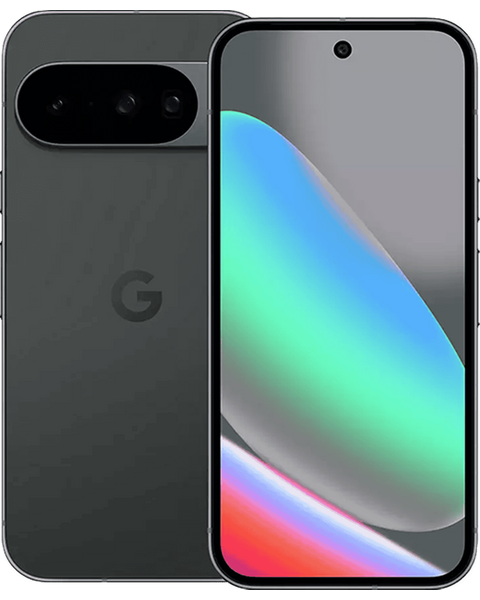
Google Pixel 10
- Screen
- 6.3-inch Actua OLED, 60 to 120Hz
- Storage choices
- 128GB, 256GB
- Rear cameras
- 48MP Wide with Macro Focus, 13MP Ultra Wide, 10.8MP 5x Telephoto
- Weight
- 204g
Android phone buying guide
Choose Pixel if you prefer Google's approach to Android and its camera tools. Choose Galaxy if Samsung's software, model range or accessories suit you better. Neither brand wins every category. Compare the exact phones, their remaining update support and the full deal cost before deciding.

Match storage, condition, data allowance and the full payment schedule.
Software
Both Android
Pixel uses Google's phone interface. Galaxy uses Samsung's One UI.
Camera choice
Model matters
Check the actual lenses and features, not only the megapixel count.
Long-term use
Check support
Update promises run from launch or first availability, not your purchase date.
Buying decision
Full cost
Include upfront payments, scheduled rises and required fees.
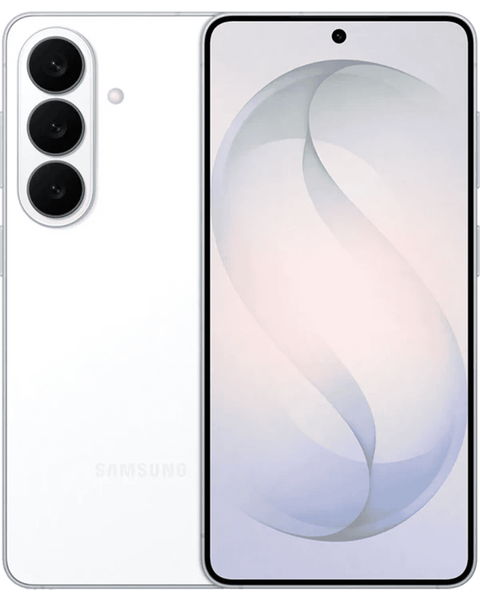
Pixel 10 and Galaxy S26 are examples from our model directories. They are different generations, not a claim about the newest phone or equal prices. Specifications below come from the shared manufacturer catalogue.
The short answer
Start with how you use a phone. A familiar interface, a comfortable size and reliable reception can matter more than a feature you rarely use. The suggestions below are buying priorities, not results from our own hands-on testing.
If you like Google's apps and camera features, look at Pixel first. Compare standard and Pro models carefully: their camera hardware and display features differ. Google's a series is another option if you do not need the top model.
If you prefer One UI or already use Galaxy accessories, start with Samsung. Its A, S and Z ranges cover different needs. Check the exact model for features such as S Pen support, folding screens and camera zoom.
Choose two phones that fit the same budget and size preference. Compare their actual specifications and current offers. A discount on one model can matter more than a general claim that one brand is better value.
Side by side
These are differences between the ranges, not promises that every phone includes every feature. Use the linked model directories to check the handset you want.
| Priority | Google Pixel | Samsung Galaxy |
|---|---|---|
| Software | Google's Pixel interface and apps | Samsung One UI and Samsung apps alongside Android |
| Model choice | Standard, Pro, a series and folding models | A series, S series and Z folding or flip models |
| Cameras | Hardware and editing tools vary by generation and tier | Lens choice varies across A, S, Ultra and folding models |
| Stylus | Check alternatives if a built-in pen is essential | Selected Ultra models have S Pen support; not all Galaxy phones do |
| Updates | Pixel 8 and later: seven years of OS and security updates | Model-specific policy; recent S series models state up to seven OS generations and seven years of security updates |
| Price | Check the exact phone, storage and current offer | Check the exact phone, storage and current offer |
Sources: Google's Pixel update guidance and technical specifications, Samsung's UK model specifications. Seven OS generations and seven years of support are different measures. Neither is seven more years from the day you buy a used phone.
Make your shortlist
Compare the parts you will notice every day before looking at optional extras.
Check width and weight as well as screen size. Two phones with the same display size can feel different in your hand. Match storage when comparing prices, and leave room for photos, downloads and apps.
Look for a dedicated telephoto lens if zoom matters. For example, Google's Pixel 10 specifications list 5x optical zoom, while Samsung lists 3x optical zoom for the Galaxy S26. That difference is not an overall camera quality verdict. Compare independent samples taken in similar conditions.
Open settings, the camera and your most-used apps on a demonstration phone if possible. Pixel and One UI organise some menus differently. Choose the interface you prefer rather than assuming extra features are useful to everyone.
Look up the exact model's update policy, then compare upfront payments, every scheduled monthly price and mandatory fees. Match data allowance, contract length and condition. Check network coverage where you use the phone.
A Galaxy A series phone, an S series Ultra and a Pixel Pro target different needs. A higher specification does not mean you need to spend more. Choose the least expensive offer that meets your requirements, with its full terms understood.

Everyday differences
Specifications help you ask better questions. They do not replace comparable real-world testing.
Compare daylight, indoor and moving-subject samples. Megapixels alone do not tell you which camera you will prefer. Check video features separately from still photography.
Check reviews of the exact UK model if gaming matters. A chipset name alone cannot tell you about sustained performance, heat or battery drain.
Battery capacity is not a battery-life test. Google's general-use estimate and Samsung's video playback figure use different methods, so do not rank them as equivalent results. Check charger requirements and whether one is supplied.
Check both operating system upgrades and security updates. Older phones can have shorter commitments than new generations from the same brand.
Check compatibility and which features need a particular phone or app. Owning accessories can influence your choice, but it does not guarantee that every feature works with every Android handset.
Check the feature's model, country, language and account requirements. Some tools need an internet connection or process data online. Read the permissions before using them with private information.

Buying for less
A refurbished phone can be an option if its condition, support and price suit you. Do not assume either brand always loses value faster or offers the better used deal. Compare current offers for the exact model.
Google states seven years of OS and security updates for Pixel 8 and later, starting from first US Google Store availability. Pixel 6 and Pixel 7 families have a different policy. Samsung support depends on the exact model, not the Galaxy name alone.
Retailers use different grading systems. Check what the grade says about scratches, screen condition and functionality rather than treating the same grade name as identical between sellers.
Check the seller's minimum battery standard and whether replacement is included. A refurbished device is not necessarily supplied with a new battery.
Check warranty length, exclusions and who handles faults. Do not assume an old water-resistance rating guarantees protection after wear or repair. Back up your data before returning a phone.
Buying an older flagship can reduce the purchase price, but compare the years of useful support remaining as well as its features. No price saving is claimed here without a checked current offer.
Our comparisons use supported approved partner feeds, not every UK retailer. We do not copy prices or stock claims from the example article.
This guide uses manufacturer specifications and support guidance. We have not tested these phones side by side and do not claim a camera, battery or performance winner. Update policies, AI availability and offers can change. Check the exact UK model and retailer's terms before ordering.
Moving from Apple
Both Google and Samsung provide ways to move data from an iPhone. The supported content and method depend on your phones, software versions and accounts. Prepare your old phone before handing it over or trading it in.
A transfer tool does not choose your mobile contract. If you change provider, arrange the number transfer separately and check any remaining handset payments.
Questions
Not for every buyer. Pixel may suit you if you prefer Google's phone software and camera tools. Galaxy may suit you if One UI, its range of designs or Samsung accessories matter more. Compare exact models at the same budget rather than declaring a brand-wide winner.
It depends on the models and the photos or video you take. Check lenses, zoom and comparable samples, not only megapixels. This guide uses specifications, not our own camera testing, so it does not name an overall winner.
Google promises seven years of OS and security updates for Pixel 8 and later, counted from first US Google Store availability. Samsung's commitment varies by model; recent S series phones state up to seven OS generations and seven years of security updates. Check the remaining support for each exact phone.
There is no reliable answer for the whole range. Compare current offers with similar age, storage, condition, battery standard, warranty and remaining update support. This guide does not claim prices or savings that have not been checked.
Yes. Google provides Pixel transfer instructions and Samsung provides Smart Switch. What transfers depends on the devices and method. Check important apps, accounts and messages before erasing or trading in your old iPhone.
No. S Pen support is model-specific. Samsung's Galaxy S26 Ultra specifications list S Pen support, but the standard Galaxy S26 does not offer the same feature. Check the exact handset before buying.
Not on capacity alone. Screen, software, reception and your usage affect battery life. Compare reviews using the same test method, and check charging requirements separately.
Match storage, condition, allowance and comparison period. Add upfront costs, every scheduled payment and mandatory fees. If price rises or required fees are unknown, a starting-price subtotal cannot prove the final contract is cheaper.
Start with the Pixel and Galaxy model directories, then compare the full terms of the offers available in our catalogue.
Compare mobile phone dealsLatest from CompareDirect
Keep reading
Check the Pixel range, specifications and available contract offers.
Read moreExplore Galaxy sizes, features and available contract offers.
Read more
Compare matched phones and mobile allowances over the same period.
Read moreCheck payments, price rises, eligibility and cancellation rights.
Read moreOriginal CompareDirect buying guidance based on the manufacturer sources listed above, not a hands-on review. Product photographs keep their supplier credit; editorial photos illustrate choosing and setting up a phone. CompareDirect may earn commission from approved partner links, without changing comparison order. Check the retailer's price, stock, eligibility and terms before ordering. Google, Pixel, Samsung and Galaxy are their respective owners' trademarks; CompareDirect is not affiliated with either manufacturer.